Real outputs
Rendered with this skill on our machine, unedited.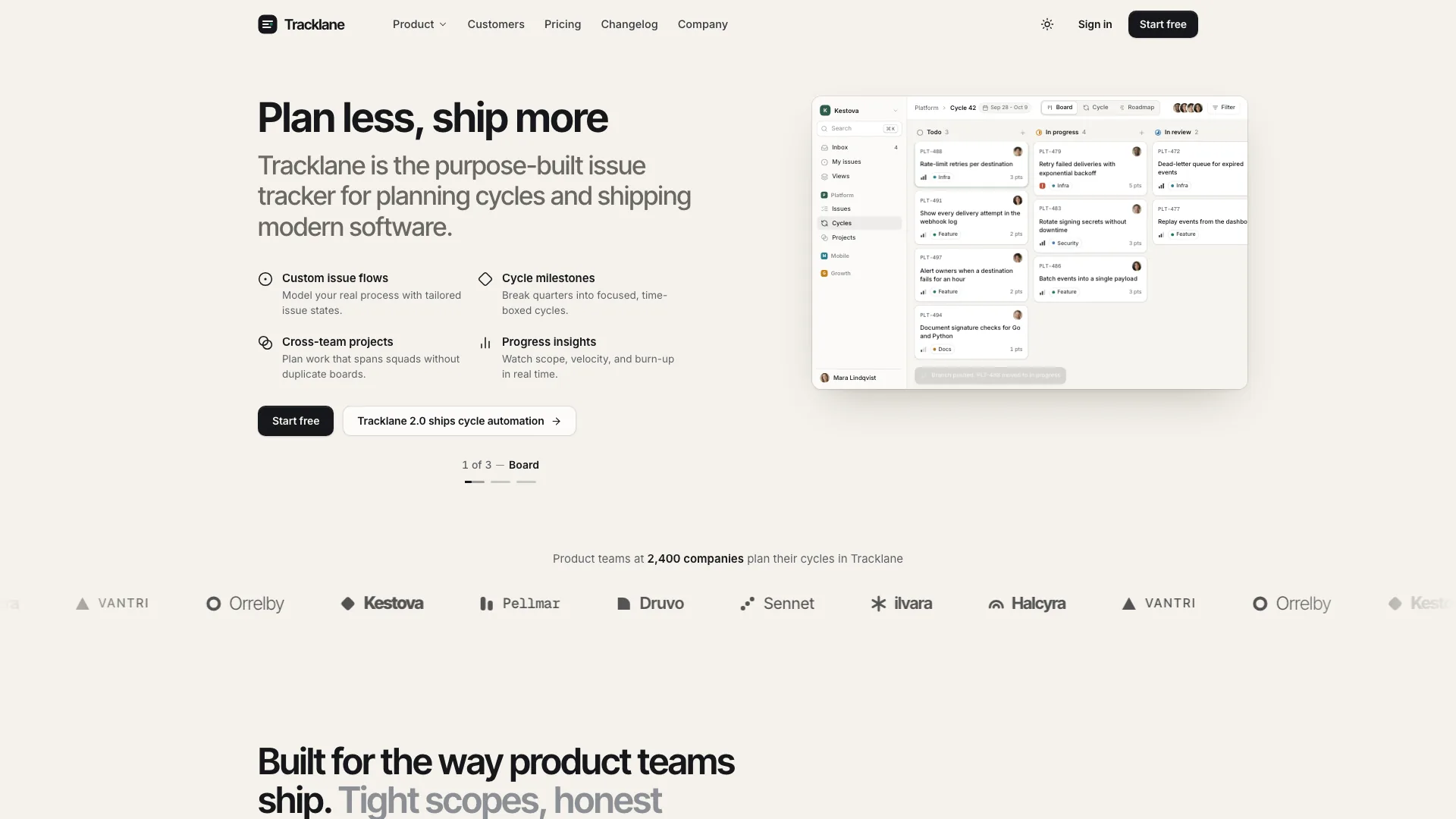
Tracklane Devtool Landing
How to use
- 1
Copy the install prompt
Sign in, then click the black button. One click, done.
- 2
Paste it to your agent
Send it in Claude Code, Codex, Cursor or similar. It installs itself.
- 3
Ask in one sentence
Say what you want, like below, and the agent follows this skill.
You:
/tracklane-devtool-landing make me: Teams launching an issue tracker, planning tool or other B2B developer product.Example message showing how to invoke it, not a real output.
What you get
- One self-contained website file that opens in any browser and works offline, with fonts and images built in; a port into your own framework project when you have one.
- A live product window with board, burn-up and roadmap views, plus a working bento, cycles tabs, command line, Git and API workflow tabs and pricing with a billing switch.
- Pricing comparison, changelog, sign-in, sign-up, book-a-demo, security, customer story, company and legal pages, with a complete dark theme.
- Teams launching an issue tracker, planning tool or other B2B developer product.
Good fit
- Teams launching an issue tracker, planning tool or other B2B developer product.
- Incident, CI or deploy tools that can map their states onto the board, burn-up and roadmap views.
- Products sold to technical buyers who expect an evaluation path, security facts and a comparison table.
- Real accounts, sign-in or form delivery; forms validate and show honest demo results only.
Not for
- Real accounts, sign-in or form delivery; forms validate and show honest demo results only.
- Sites that need a content management system or several languages out of the box.
- Showing real customer logos or claims you cannot confirm; the marquee and quotes are dropped without real customers.
What you need
- Claude Code, Codex, or Cursor
- Pack ships as a local skill folder
- License
- Skilloop Free
- Author
- @Skilloop
- Version
- v1.0.5
- Output
- Web
- Generates with
Runs in:Claude CodeCodexCursor
Built and maintained by Skilloop (Pro). Every sample below was produced by this exact skill. Source packages are proprietary — not MIT.
Package contents
- tracklane-devtool-landing/SKILL.md
- tracklane-devtool-landing/references/icon-library.md
- tracklane-devtool-landing/references/image-plan.md
- tracklane-devtool-landing/references/images/av-amaya.webp
- tracklane-devtool-landing/references/images/av-daniel.webp
- tracklane-devtool-landing/references/images/av-felix.webp
- tracklane-devtool-landing/references/images/av-ingrid.webp
- tracklane-devtool-landing/references/images/av-lucia.webp
- tracklane-devtool-landing/references/images/av-mara.webp
- tracklane-devtool-landing/references/images/av-noor.webp
- tracklane-devtool-landing/references/images/av-owen.webp
- tracklane-devtool-landing/references/images/av-tobi.webp
- tracklane-devtool-landing/references/images/qf-amara.webp
- tracklane-devtool-landing/references/images/qf-jonas.webp
- tracklane-devtool-landing/references/images/qf-kenji.webp
- tracklane-devtool-landing/references/images/qf-rhea.webp
- tracklane-devtool-landing/references/images/quote-amara.webp
- tracklane-devtool-landing/references/images/quote-jonas.webp
- tracklane-devtool-landing/references/images/quote-kenji.webp
- tracklane-devtool-landing/references/images/quote-rhea.webp
- tracklane-devtool-landing/references/images/story-vantri.webp
- tracklane-devtool-landing/references/images/team-tracklane.webp
- tracklane-devtool-landing/references/motion-system.md
- tracklane-devtool-landing/references/quality-checklist.md
- tracklane-devtool-landing/references/section-inventory.md
- tracklane-devtool-landing/references/style-guide.md
- tracklane-devtool-landing/references/template.html
- tracklane-devtool-landing/scripts/inline-assets.mjs
- tracklane-devtool-landing/scripts/validate-template.mjs
SKILL.md
Build a complete developer-tool marketing site with a warm sand canvas, mint section bands, tight headlines and a quiet split hero beside a live product window. Workflow tabs, an evaluation path, security, pricing and companion pages…
Other ways to install
ZIP download works while signed in. For curl installs, create an API key under Settings → API keys and set SKILLHUB_API_KEY.
Install prompt (paste into your agent)
This is a free Skilloop skill (Tracklane Devtool Landing). Download https://skilloop.dev/downloads/free/tracklane-devtool-landing.zip (or use the install command on the skill page), then unzip into ~/.claude/skills or ~/.agents/skills so tracklane-devtool-landing/SKILL.md exists. Or: Read https://skilloop.dev/skills/tracklane-devtool-landing/install.md and follow the instructions.
One-line install (download + unzip) · Claude Code
mkdir -p ~/.claude/skills && curl -fsSL https://skilloop.dev/downloads/free/tracklane-devtool-landing.zip -o /tmp/tracklane-devtool-landing.zip && unzip -oq /tmp/tracklane-devtool-landing.zip -d ~/.claude/skills/
One-line install (download + unzip) · Codex / Cursor
mkdir -p ~/.agents/skills && curl -fsSL https://skilloop.dev/downloads/free/tracklane-devtool-landing.zip -o /tmp/tracklane-devtool-landing.zip && unzip -oq /tmp/tracklane-devtool-landing.zip -d ~/.agents/skills/
Manual · Claude Code
# Free skill — download the public ZIP (no sign-in):
mkdir -p ~/.claude/skills && curl -fsSL https://skilloop.dev/downloads/free/tracklane-devtool-landing.zip -o /tmp/tracklane-devtool-landing.zip && unzip -oq /tmp/tracklane-devtool-landing.zip -d ~/.claude/skills/