How to use
- 1
Copy the install prompt
Sign in, then click the black button. One click, done.
- 2
Paste it to your agent
Send it in Claude Code, Codex, Cursor or similar. It installs itself.
- 3
Ask in one sentence
Say what you want, like below, and the agent follows this skill.
You:
/logo-lockup make me: Horizontal, stacked, icon and reversed logo lockups with usage rulesExample message showing how to invoke it, not a real output.
What you get
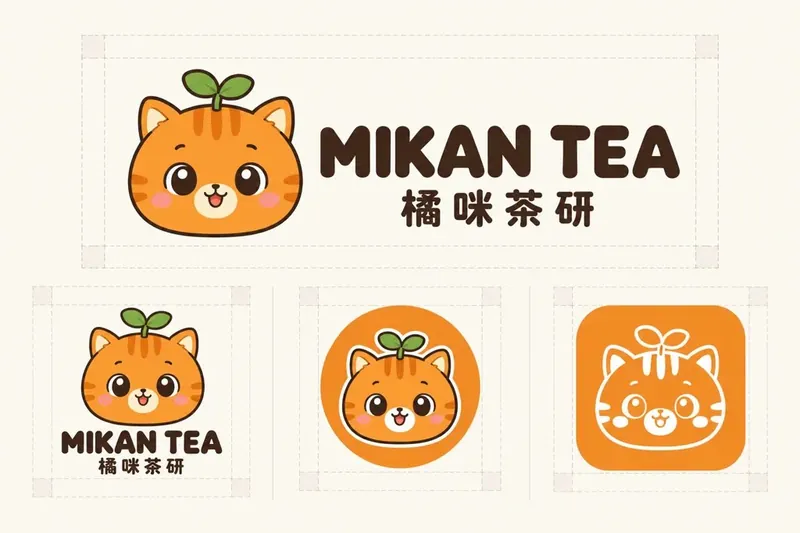
- Four standard lockup variants
- Usage rules ready for a brand book
- A QA checklist
Good fit
- Horizontal, stacked, icon and reversed logo lockups with usage rules
Not for
- Trademark clearance or final vector files
What you need
- An image model (defaults to GPT Image 2.5; prompts also work in Gemini, Seedream, Midjourney)
- License
- MIT
- Author
- @xianyu110
Runs in:Claude CodeCodexCursorGemini CLIOpenCode
Upstream description
Use when the user needs a brand logo built from a symbol plus wordmark — 图形+字标组合、横版/竖版/图标版/反白版 lockups, clear-space and minimum-size rules — often derived from an existing IP character. Triggers: logo 设计, 标志组合, 字标, lockup, 品牌 logo, wordmark, app icon.
Other ways to install
Prefer doing it yourself? These commands do the same as the button.
Install prompt (paste into your agent)
Read https://skilloop.dev/skills/logo-lockup/install.md and follow the instructions to install the skill.
One-line install · Claude Code
npx skills add https://github.com/xianyu110/brand-ip-kit-skills/tree/main/skills/logo-lockup -g -a claude-code
One-line install · Codex / Cursor
npx skills add https://github.com/xianyu110/brand-ip-kit-skills/tree/main/skills/logo-lockup -g -a codex
Manual (git) · Claude Code
git clone --depth 1 https://github.com/xianyu110/brand-ip-kit-skills.git /tmp/brand-ip-kit-skills
mkdir -p ~/.claude/skills && cp -r /tmp/brand-ip-kit-skills/skills/logo-lockup ~/.claude/skills/logo-lockup
Original work by its authors, redistributed under its license. We only link and describe it.